TL;DR
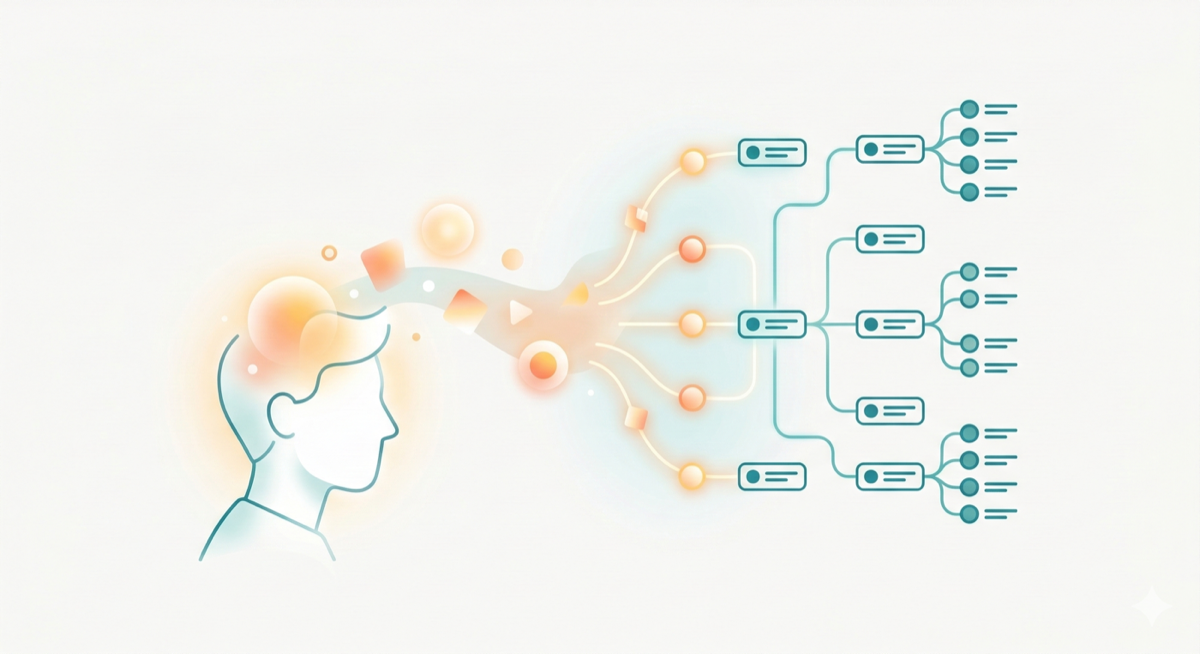
Mindskribe captures your thoughts in one tap — voice or text — then AI organizes everything into a knowledge graph, generates notes, and surfaces emotional patterns. Here’s how to get started.
You have thousands of thoughts every day — ideas, reflections, observations, worries, plans. Most of them disappear before you can act on them. Mindskribe was built to change that.
Mindskribe is an AI-powered thought capture app that lets you quickly jot down whatever is on your mind, and then uses artificial intelligence to organize your thoughts, find patterns, and help you build on your thinking over time. Think of it as a second brain that actually understands what you're thinking about.
Available on iOS, Android, and the web at web.mindskribe.com, Mindskribe works wherever you are. In this guide, we'll walk you through everything you need to know to get started.
Capture Your First Thought
The core of Mindskribe is the thought — a short text entry, like a note, but designed to be quick and effortless. One idea per thought works best.
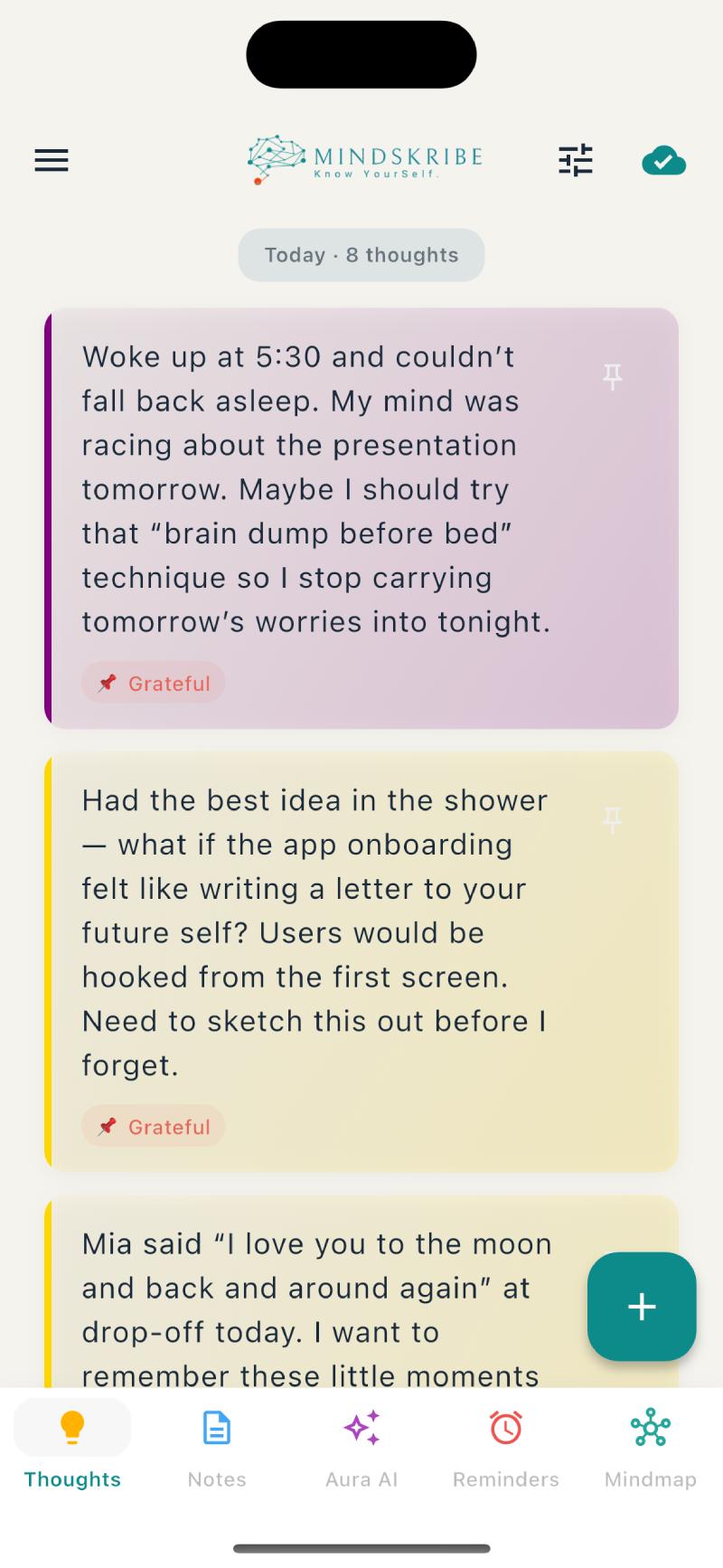
To capture a thought, tap the compose button (+) and start writing. That's it. No folders to choose, no categories to pick. Just write what's on your mind, and Mindskribe handles the rest. The screenshot below shows the thoughts feed in action.
Here are a few things to know about thoughts:
- Keep them short and natural — A single sentence is perfectly fine. "Had a breakthrough idea for the marketing campaign" is a great thought.
- Use hashtags — Add tags like #work, #ideas, or #health to help the AI categorize your thinking. For example: "Met with Sarah about the Q4 roadmap #work #strategy"
- Pin important ones — Tap to pin thoughts you want to revisit. Pinned thoughts stay at the top of your list.
- Works offline — Capture thoughts even without internet. They sync automatically when you reconnect.
Key Takeaway
Don't overthink it. The best way to start is to just write whatever comes to mind. The more thoughts you capture, the smarter the AI becomes at helping you.
Meet Aura, Your AI Assistant
Aura is Mindskribe's built-in AI assistant. Once you've captured a few thoughts, Aura becomes your thinking partner — able to search, summarize, and surface insights from everything you've written.
What You Can Ask Aura
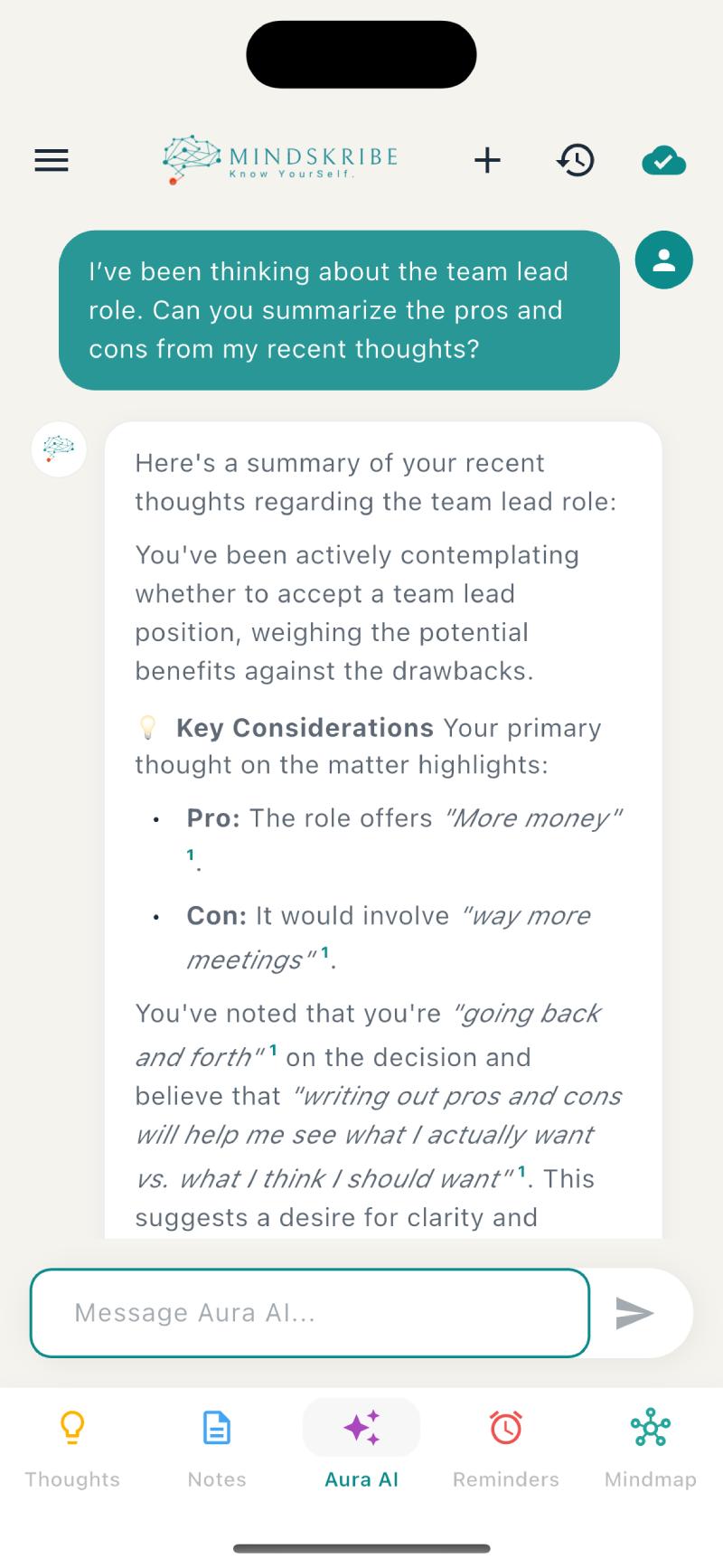
Aura understands natural language. Just ask what you want to know: As shown below, Aura responds with citations you can tap.
- "What have I been thinking about lately?" — Get an overview of your recent themes
- "Summarize my thoughts about [project]" — Get a structured summary of a specific topic
- "What patterns do you see in my thinking?" — Discover trends you might not notice
- "Find my thoughts about [person or concept]" — Instantly retrieve relevant entries
- "Create a note summarizing my thoughts on [topic]" — Generate a polished document from your raw thinking
Tips for Better Results
- Be specific — "What did I think about the marketing campaign?" works better than "Tell me stuff"
- Mention time periods — "My thoughts from last week" helps Aura narrow results
- Name people and projects — Aura leverages its knowledge graph to find related thoughts
- Use suggestion chips — After each response, Aura shows tappable follow-up suggestions. Tap them to explore deeper.
- Tap citation numbers — When Aura references your thoughts, it shows superscript numbers. Tap them to see the original thought.
Generated Notes
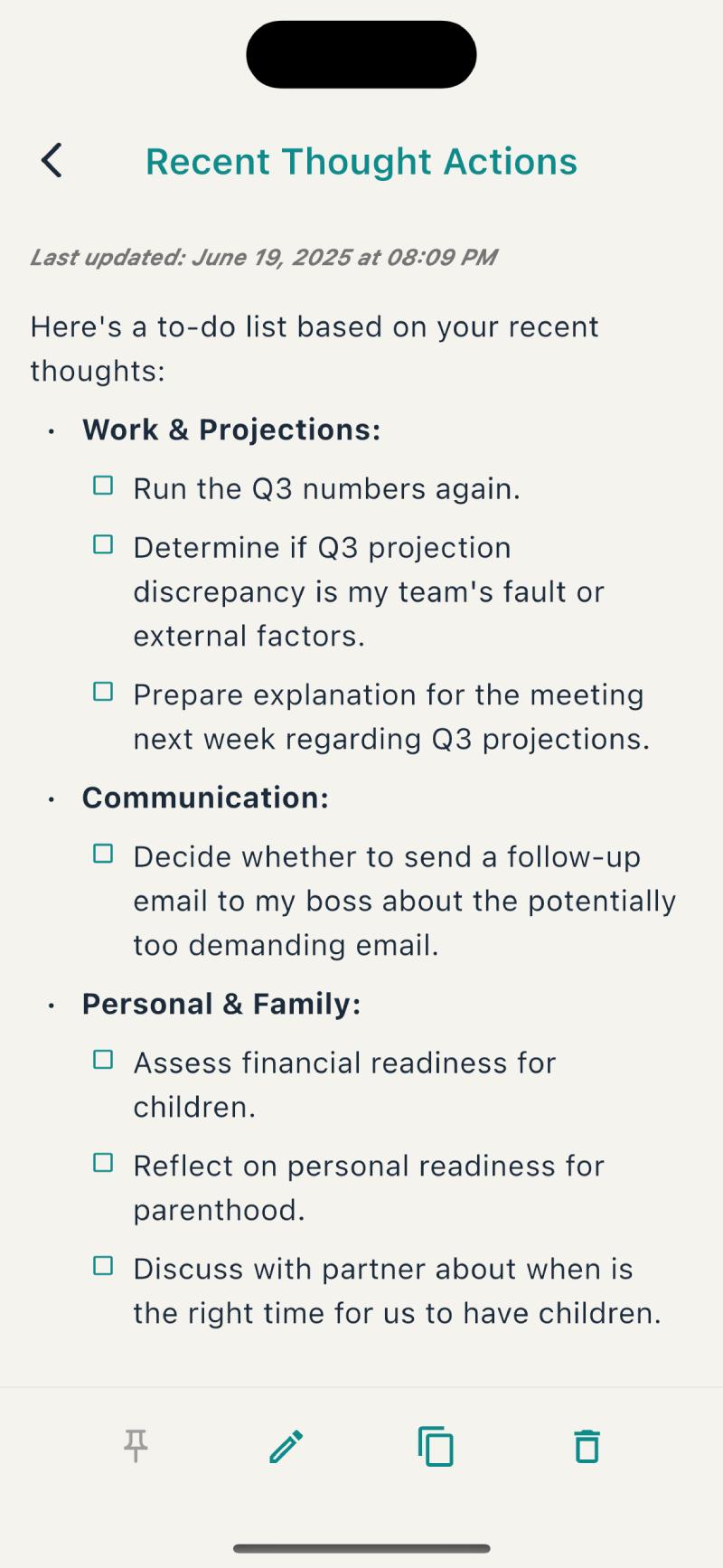
When you ask Aura to "create a note," it generates a structured document with a title and formatted content — pulled from your raw thoughts. Generated notes appear in their own section and are perfect for turning scattered thinking into actionable summaries. The generated note below shows how AI organizes your thinking.
Try asking Aura to:
- "Create a summary of my project thoughts" — get a structured project brief
- "Make a to-do list from my recent tasks" — get an organized action list
- "Write up my key takeaways from this week" — get a weekly reflection
Discover Your Mind Map
This is where Mindskribe truly shines. The AI automatically organizes all your thoughts into a meaningful hierarchy — no manual sorting required.
How the Hierarchy Works
Mindskribe uses semantic understanding (not just keywords) to cluster your thoughts into a three-level structure: The Mind Map below illustrates this hierarchy.
- Notebooks — Broad categories like "Work Projects" or "Personal" (up to 5)
- Sections — Topics within a category, like "Project Alpha" or "Health & Fitness" (up to 10 per notebook)
- Pages — Specific subtopics like "Design Decisions" or "Exercise" (up to 20 per section)
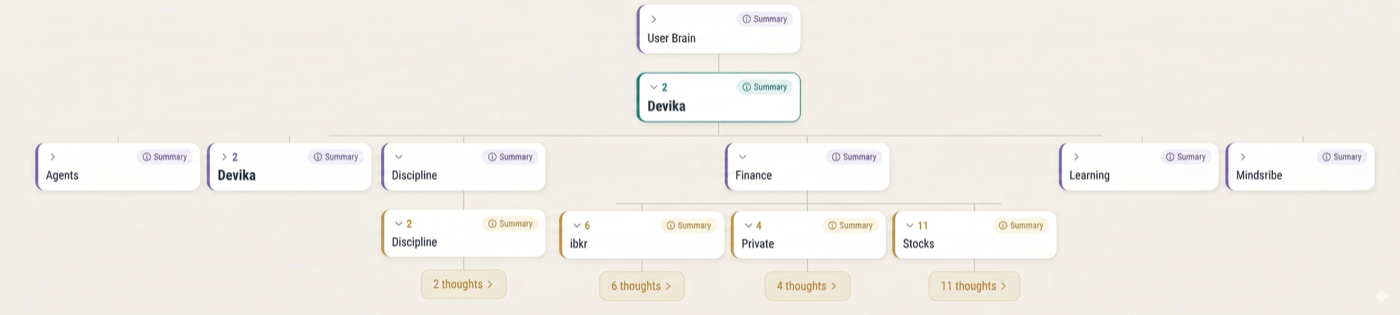
Each page, section, and notebook gets an AI-generated summary. Related pages are linked so you can discover connections across different areas of your thinking. The hierarchy evolves as you add more thoughts — your Mind Map literally grows with you.
Key Takeaway
Check your Mind Map weekly to see how the AI has organized your thinking. You'll often discover surprising patterns and connections you hadn't noticed.
Set Reminders So Nothing Slips
Had a great idea? Don't let it fade. Mindskribe lets you set reminders with push notifications so you can act on your thoughts at the right time.
Just tell Aura what you need in natural language: The screenshot below shows reminders in action.
- "Remind me to call the dentist tomorrow at 10am"
- "Set a weekly reminder for team standup on Mondays at 9am"
- "Remind me to review my goals every Sunday at 7pm"

Aura handles the details. Reminders support daily, weekly, monthly, and yearly recurrence. Each reminder card shows an emoji avatar based on the content, a color-coded urgency border, and smart time chips that adapt to how soon the reminder is due.
You can manage all your reminders by asking Aura to "show my reminders," and acknowledge them directly from push notifications by tapping "Mark as Done."
Track Your Emotional Patterns
Mindskribe automatically analyzes the emotional tone of each thought using Plutchik's Wheel of Emotions, a well-established psychology model that tracks eight primary emotions: Joy, Sadness, Anger, Fear, Trust, Disgust, Anticipation, and Surprise.
You'll see a small emotion chip on each thought card showing the dominant emotion with a color-coded emoji — like "Trust" or "Joy." You can filter your thoughts by emotion to answer questions like "When was I feeling anxious?" or "Show me all my joyful thoughts."
Weekly Emotion Insights
Navigate to the Aura tab → Insights view to see a rich weekly breakdown: The insights dashboard below shows these visualizations.
- Dominant Emotion Card — Your most prominent emotion for the week with percentage
- Valence Meter — A gauge showing your overall emotional tone from negative to positive
- Emotion Profile Heat Map — All 8 emotions ranked by intensity
- Emotional Balance Pairs — Opposing emotions side-by-side (Joy vs. Sadness, Trust vs. Disgust)
- Valence Over Time — A line chart tracking your emotional positivity across the week
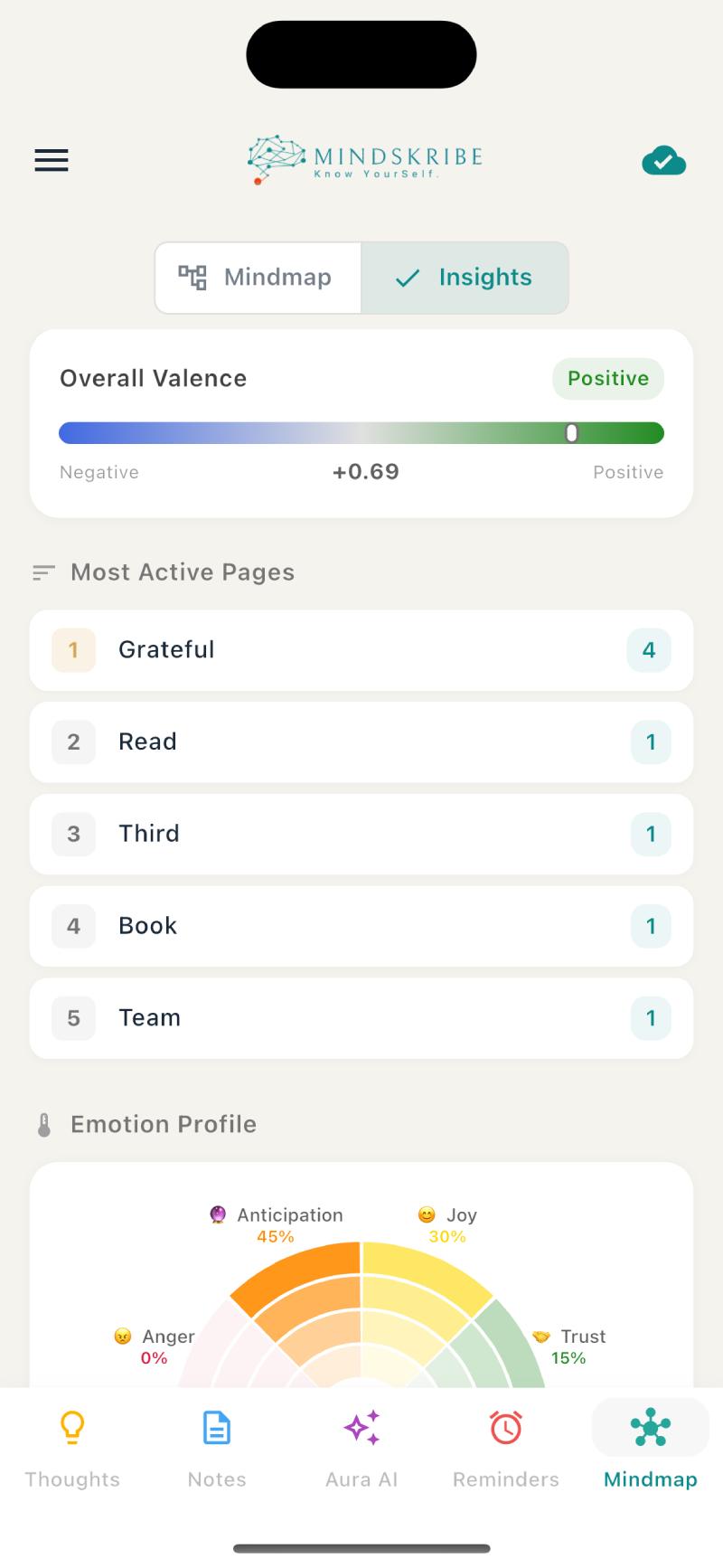
Use the arrows at the top to navigate between weeks and spot trends over time.
Use Mindskribe on the Web
For longer AI conversations or deep-dive sessions into your Mind Map, the web app at web.mindskribe.com gives you a full desktop experience with a multi-column layout optimized for larger screens. The screenshot below shows the full desktop experience.
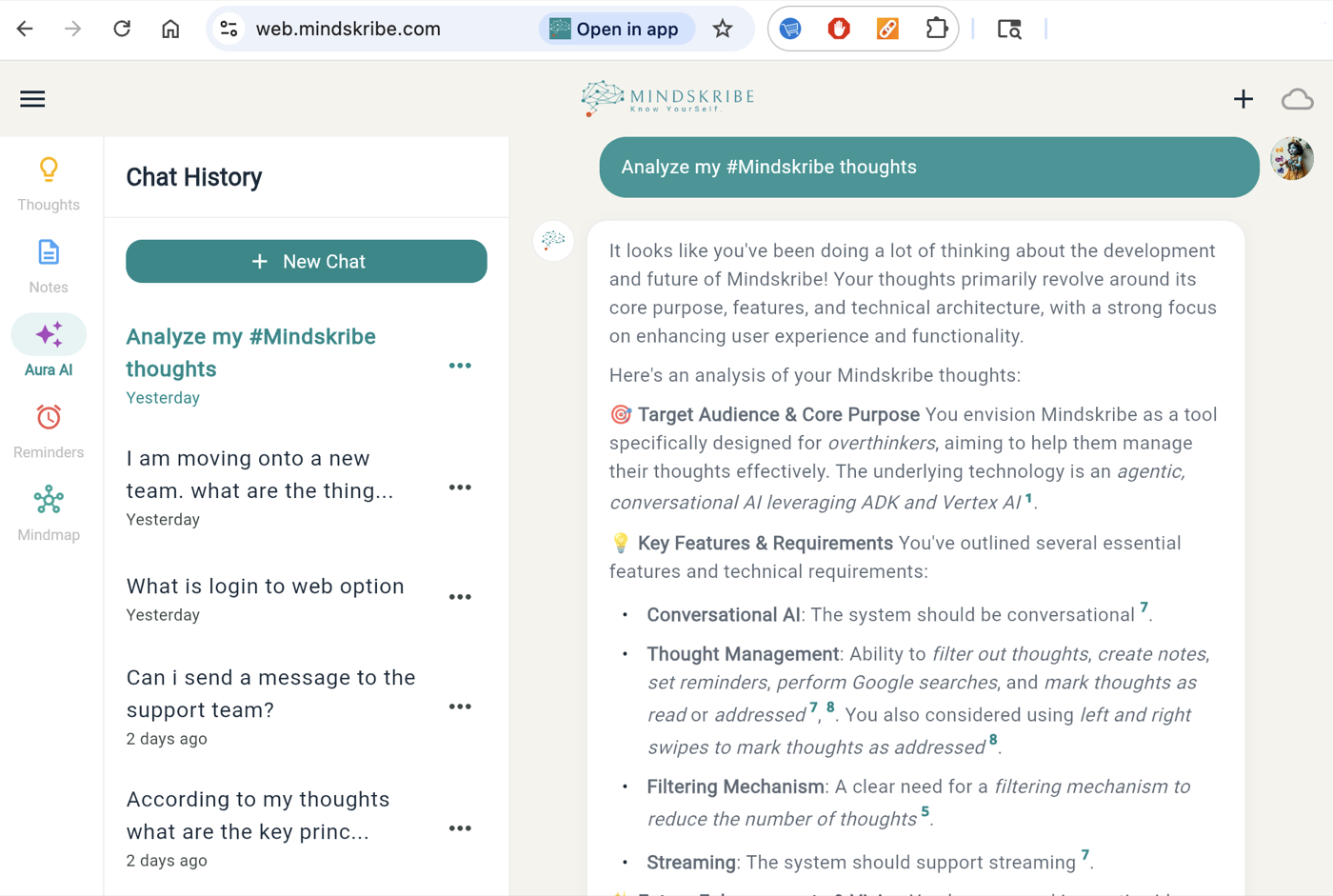
How to Log In
- Go to web.mindskribe.com in any modern browser
- A QR code appears on the login screen
- Open the Mindskribe mobile app
- Tap the hamburger menu (top-left) → "Log in to Web"
- Scan the QR code with your phone
- Approve the login — you're in
Everything stays in sync between mobile and web. All core features are available on both platforms — the only exceptions are offline mode and push notifications, which are mobile-only.
Best Practices to Get the Most Out of Mindskribe
After working with thousands of thoughts from our users, here's what we've learned works best:
- Capture frequently — The more thoughts you record, the richer your Mind Map becomes and the better Aura can help you. Many short thoughts are better than a few long ones.
- Use hashtags strategically — Tags like #work, #personal, #ideas, and #goals give the AI a head start on categorization.
- Ask Aura for weekly reflections — Try "What themes have been on my mind this week?" every Sunday. It's a powerful self-reflection practice.
- Create generated notes — When thoughts on a topic pile up, ask Aura to consolidate them into an actionable summary.
- Set reminders for follow-ups — Had a great idea? Set a reminder to revisit it in a few days when you have time to act.
- Check your emotion insights — Your weekly emotional patterns reveal what's driving your stress, joy, or motivation.
- Try cross-topic questions — Ask Aura "How do my work thoughts relate to my personal goals?" to discover surprising connections.
Key Takeaway
The magic of Mindskribe happens over time. Start by capturing just a few thoughts a day. Within a week, Aura will start surfacing patterns you never expected.
Getting Help
If you ever need assistance, Mindskribe has built-in support:
- In-app support — Open the hamburger menu → "Help & Feedback" to send a message directly to the team
- Chat with the Support Agent — Our AI support assistant can answer common questions right in the app
- Response time — The team typically responds within 24-48 hours
Your thoughts are completely private — only you can access them. Mindskribe uses secure authentication, encrypted data transmission, and your thoughts are never shared with other users or used to train AI models. You can delete your account at any time, which permanently removes all your data.
Ready to start? Download Mindskribe on iOS or Android, or open web.mindskribe.com in your browser. Your clearer mind is just a thought away.